
Designing at the Speed of AI Coding Agents

I still remember the first time I decided not to open Figma.
It was not a dramatic decision. There was no big announcement like “from today, I am replacing my design tool.” It was more practical than that. Engineers around me were already using Cursor and Claude Code to move much faster. They could generate multiple working ideas in code, try different flows, and come back with something people could actually click.
Meanwhile, if I stayed in the old workflow, I would still be making a Figma file and then explaining how it should work.
That gap felt weird.
A designer is supposed to help the team move toward the right product. But if the team is exploring in code and I am still responding with static screens, I slowly become a checkpoint. I review. I correct. I say “this does not match the design.” I ask someone to move a button or fix a line.
I do not think that is the best use of design.
So at AppZen, I started shifting my product design workflow into code. Not because Figma is bad. I still use it as a whiteboard or a place to put screenshots. But for product exploration, especially when interaction and data structure matter, I now prefer a code-based prototyping workflow powered by AI agents.
The prototype repo
The setup is fairly simple.
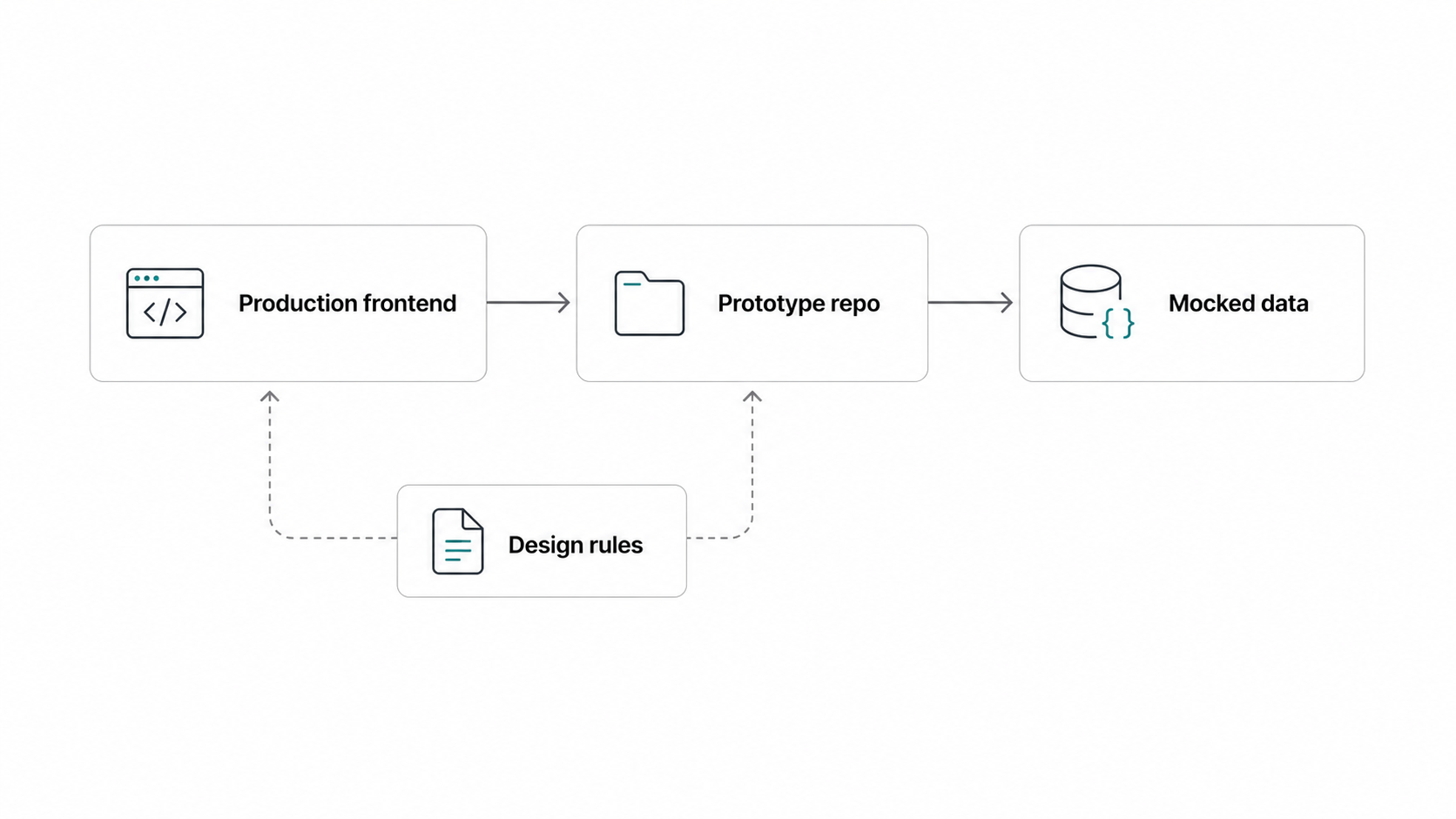
I created a separate prototype repository that is cloned from our production frontend codebase. It uses the same frontend stack and similar product patterns, but it is disconnected from the backend. API calls are replaced with mocked data, so I do not need AWS tokens or live backend services just to explore an idea.
This is important because prototyping should feel light. If I need to spend half a day fixing environment issues before trying an interaction, I will probably go back to Figma. The prototype repo gives me something close enough to the real product, but still fast enough for design exploration.
The prototype is not meant to be a perfect production branch. But it is also not a throwaway mockup. It is React/Next.js code that uses familiar schemas and product patterns. When the direction works, engineering does not need to reinterpret everything from a static file. The idea already exists in the same medium as the product.
That changes the handoff.
It is not literally zero handoff. There is always cleanup, review, and engineering judgment. But the gap is much smaller than the old Figma-to-code translation process.
AI rules became part of the design system
The first version of this workflow was not enough.
If I just let AI generate code freely, it creates its own taste. It may use random colors, create one-off components, or ignore product patterns that already exist. That is not design velocity. That is just messier design debt.
So I started writing rules in markdown.
These rules cover things like color, typography, component usage, content style, and when to use an existing shared component instead of creating a new one. Some rules are very specific. For example, if the agent wants to create a new component, it should first answer why an existing component cannot solve the problem.
The funny part is that these markdown files are not really written for humans to read every day. They are mostly for AI agents. Humans can read them, of course, but the main value is that Claude or Cursor can reference them while generating prototypes.
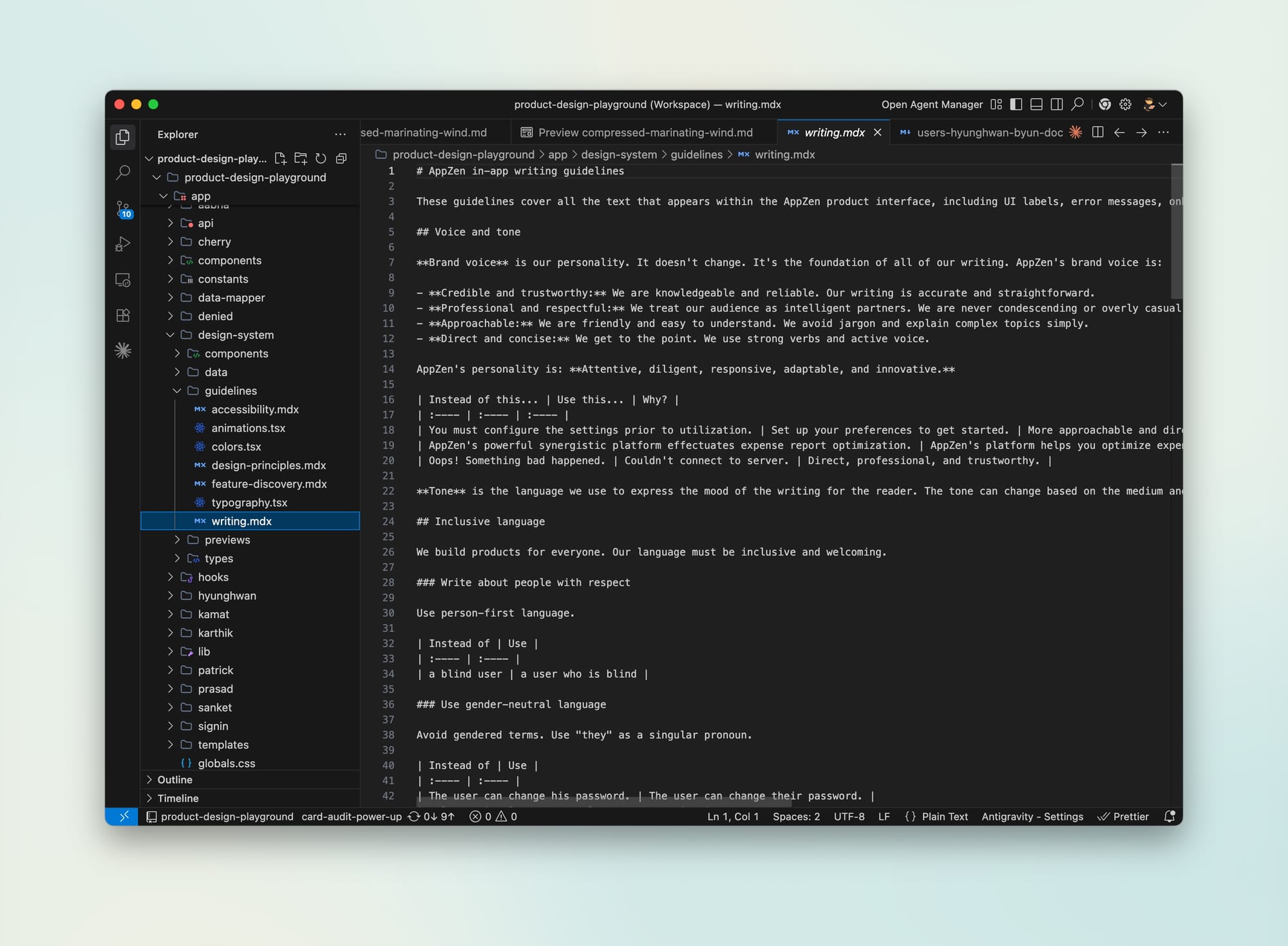
We also keep some of these rules in the production frontend repository. That helps engineers too. If a developer is working on a small design fix, they can ask the AI to follow the same rules instead of waiting for me to review every detail.
This changed the collaboration pattern in a subtle but important way. Design quality becomes more self-serve. Not perfect, but more distributed.
I still correct the AI a lot. I would not pretend that the output is magically production-ready. A large amount still needs manual adjustment. But the corrections are often repetitive. I keep saying things like, “use this existing pattern,” or “do not create a new component for this,” or “this table should follow the same behavior as this other page.”
When I notice myself repeating the same review questions, I start to think: this should probably become an agent.
That is one of the next things I want to build — an agent check that runs when someone pushes to the prototype repo. It could catch design system issues, auto-fix the safe ones, and leave comments when the decision needs human judgment.
The important part is the boundary. I do not want an agent that blindly fixes everything. I want it to know when to act and when to ask.
Figma is still useful, but not the center
I still use Figma.
But the role changed. Figma is now closer to a whiteboard, a scratchpad, or a presentation surface. If we are in an early meeting and just need to place screenshots or talk through rough concepts, Figma is fine.
But once I need to explore real interaction, real-ish data, edge cases, or handoff, code is better.
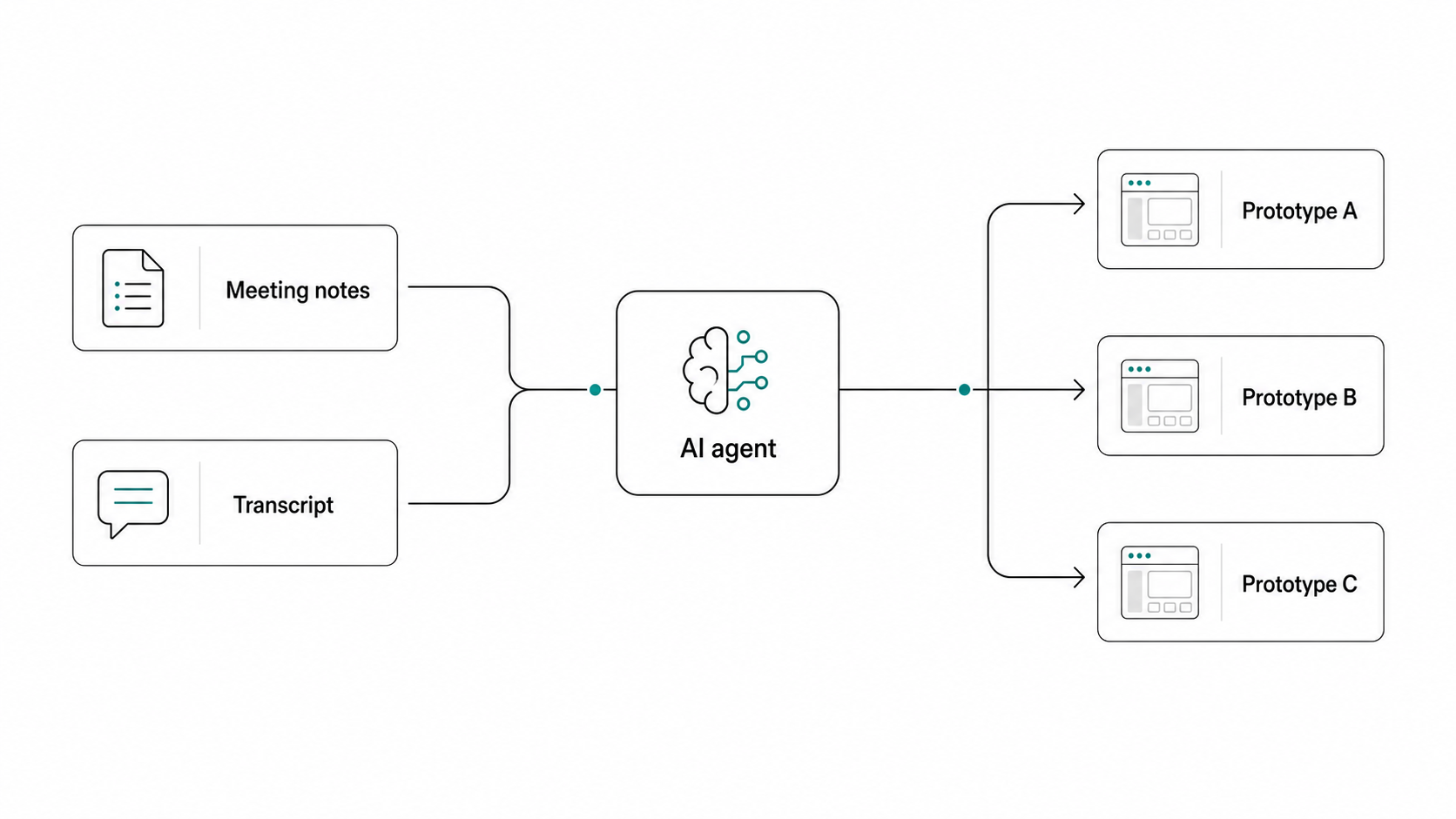
This also changed meetings. I use Granola and Zoom transcription to capture conversations, and then I use those notes as input for the next round of exploration. We do not need to make one polished mockup during the meeting. We can talk, capture the thinking, and later turn it into multiple directions.
That makes the process less single-threaded.
In the old workflow, one person often had to go away, make the “official” design, and bring it back. Now multiple explorations can happen in parallel. The bottleneck is less about drawing speed and more about judgment: which customer problem matters, which direction is credible, and what we should actually ship.
How I actually use it every day
Most of my daily work happens in a cmux main workspace connected to the prototype repo. I also keep separate workspaces for different contexts: one for engineering prototypes, one for PM explorations, and separate production codebase workspaces when I need to inspect existing implementations.
This may sound like over-organization, but it helps. AI agents are sensitive to context. If I mix too many unrelated things, the output gets worse. Separate workspaces keep the agent focused.
When someone else creates a prototype, I can ask Claude to inspect the code and distill the user flow, the Jobs To Be Done, and the functional intent. I am not always trying to review the visual design first. Sometimes I just want to understand what the prototype is trying to prove.
When I need to bring a production pattern into the prototype repo, I give Claude both contexts. It compares the production implementation with the prototype target, asks questions, writes a plan, and then implements it.
For bigger tasks, I usually review the plan in my IDE instead of the terminal. Reading a long markdown plan in a terminal is not a good review experience. I want to edit the plan, think through the sequence, and then approve the execution.
That is a small workflow detail, but it matters. If I cannot review the plan clearly, I cannot trust the agent.
The playground needs an entry point
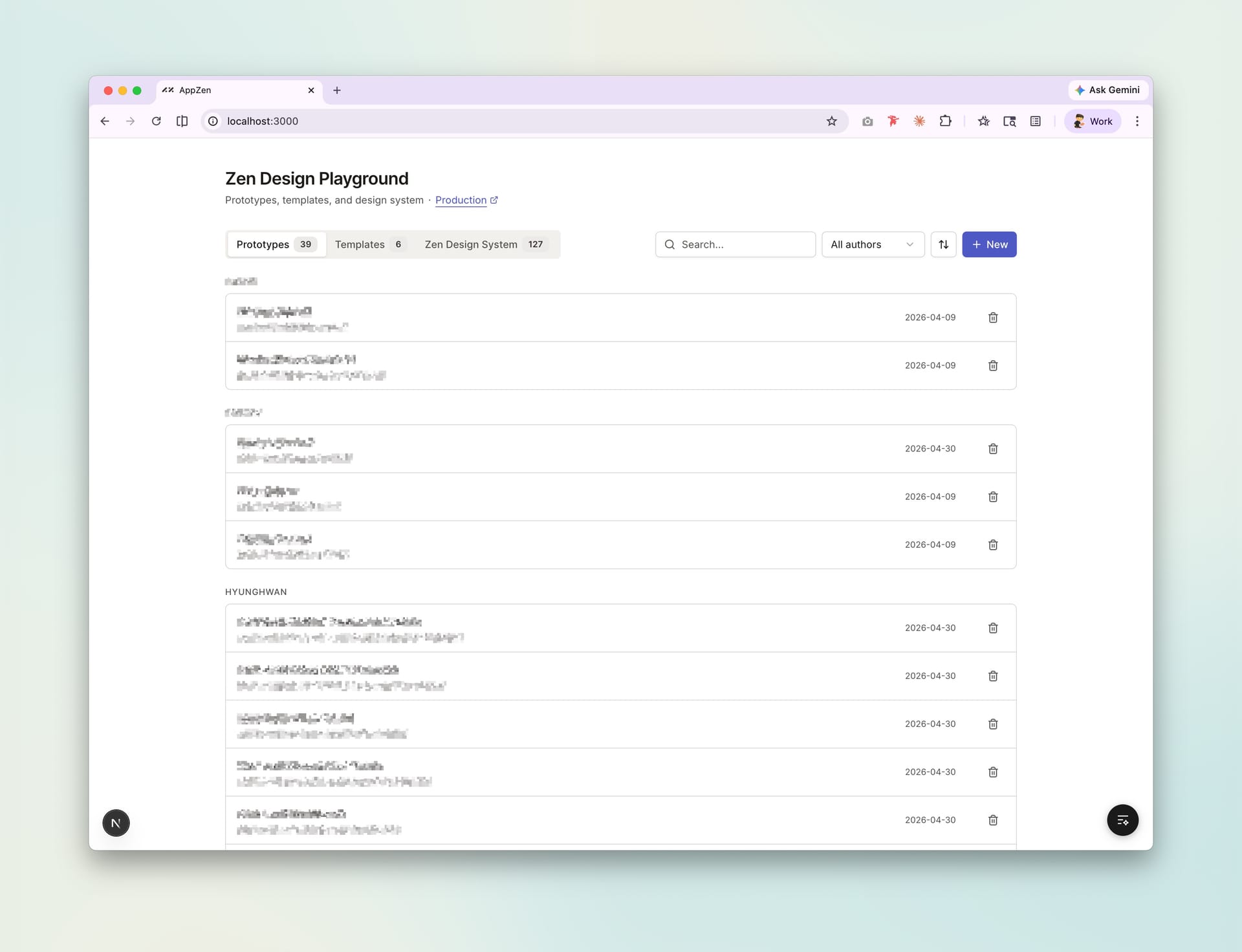
One thing I built inside the prototype repo is a gallery-style interface.
It lists prototypes, groups them by creator, supports search, and has an “Add prototype” button that only appears locally. That button runs scripts to create the boilerplate files and routes for a new prototype.
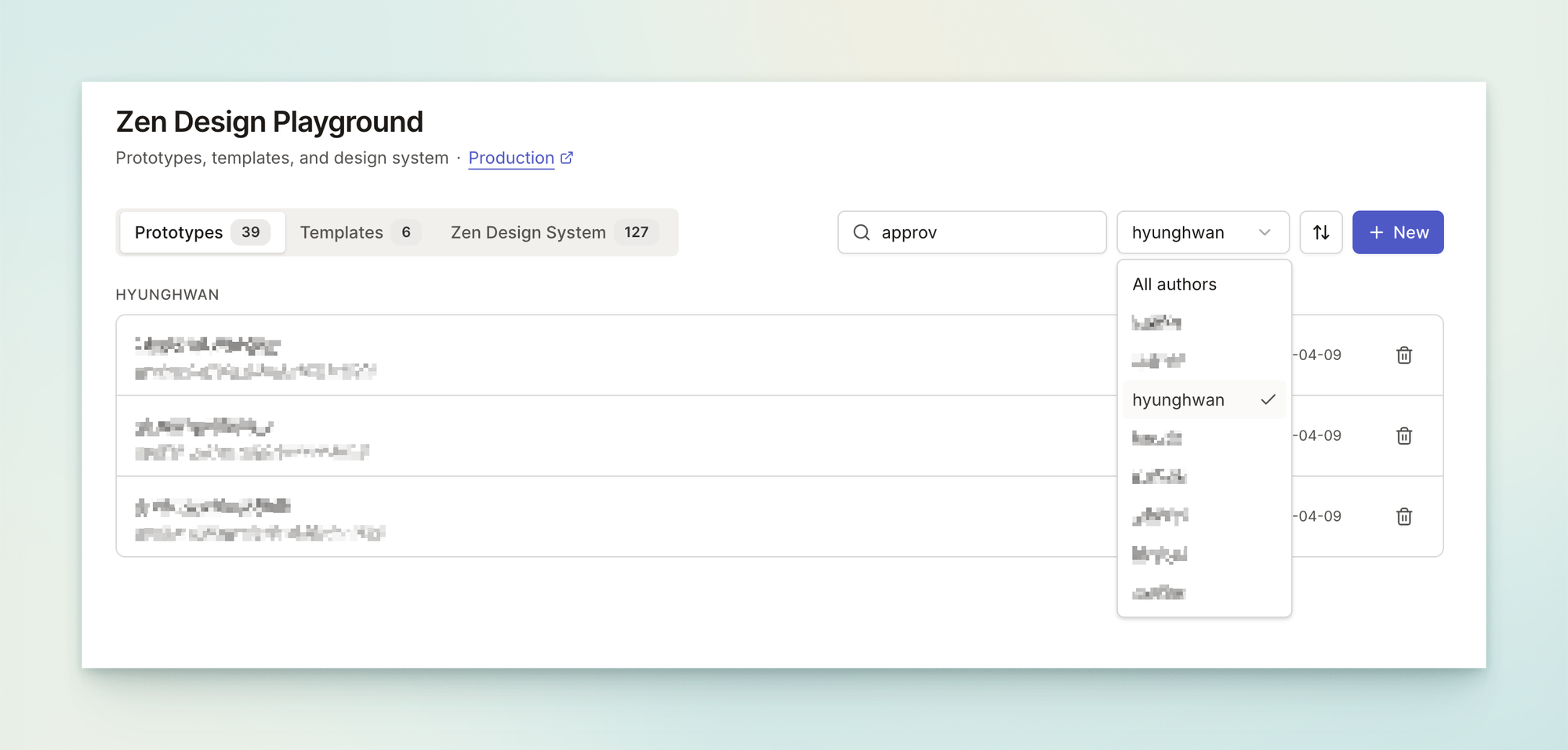
There is also a templates section for shipped features. If something worked before, we should be able to reuse it instead of starting from zero.
This part is not technically impressive. But it matters because a workflow needs an entry point. If the prototype repo feels like a pile of random branches, nobody wants to use it. If it feels like a small internal product, people are more likely to come back.
Sharing is the part I still do not love
The weakest part of the workflow right now is sharing.
We can deploy prototypes to Vercel with SSO, which solved an important security concern. But branch-based sharing is still awkward because each new branch URL needs to be allowed through Google configuration. The main branch is easy to share internally. Exploration branches are not.
Sometimes the easiest way to share is still from a local machine, which is not ideal.
Vercel commenting helps. The Chrome extension gives a Figma-like commenting experience on top of deployed prototypes. People can select a region, leave comments, mention others, and attach screenshots automatically.
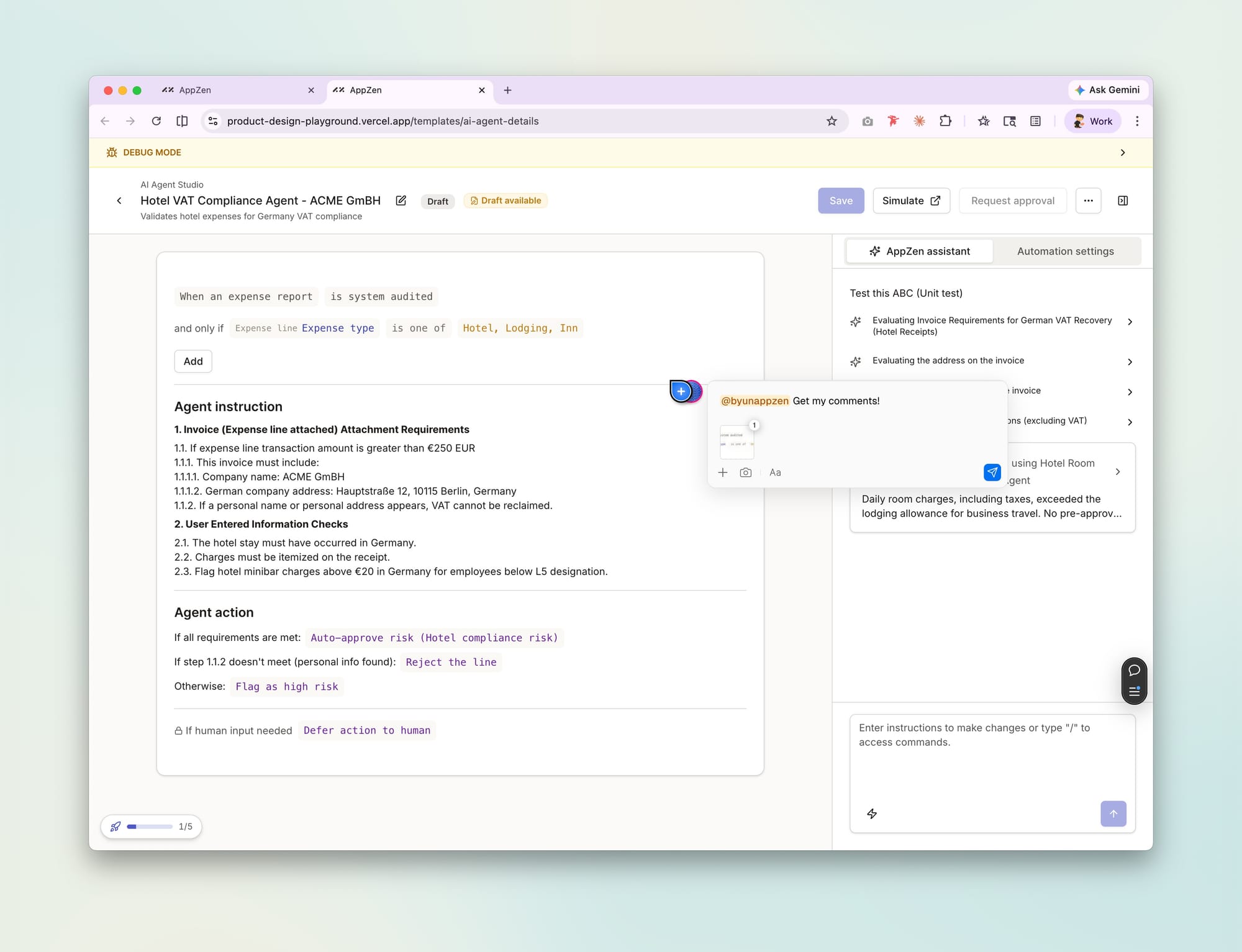
That gives us some of the review behavior people liked in Figma. But I still do not think we have the perfect solution for secure, commentable, branch-based sharing — especially if the audience includes external customers.
Internal review, customer-facing prototypes, and design critique may need different sharing models.
Component work is good, but still too manual
For component work, I often create an empty page that only loads the component and its variations.
For example, when working on a date range picker, I started from a Shadcn calendar component and pulled feedback from customer tickets, Jira, and Slack. The issues were very practical: presets, time zone support, interaction problems, and missing states. I extended the component in the playground and handed React code to engineering.
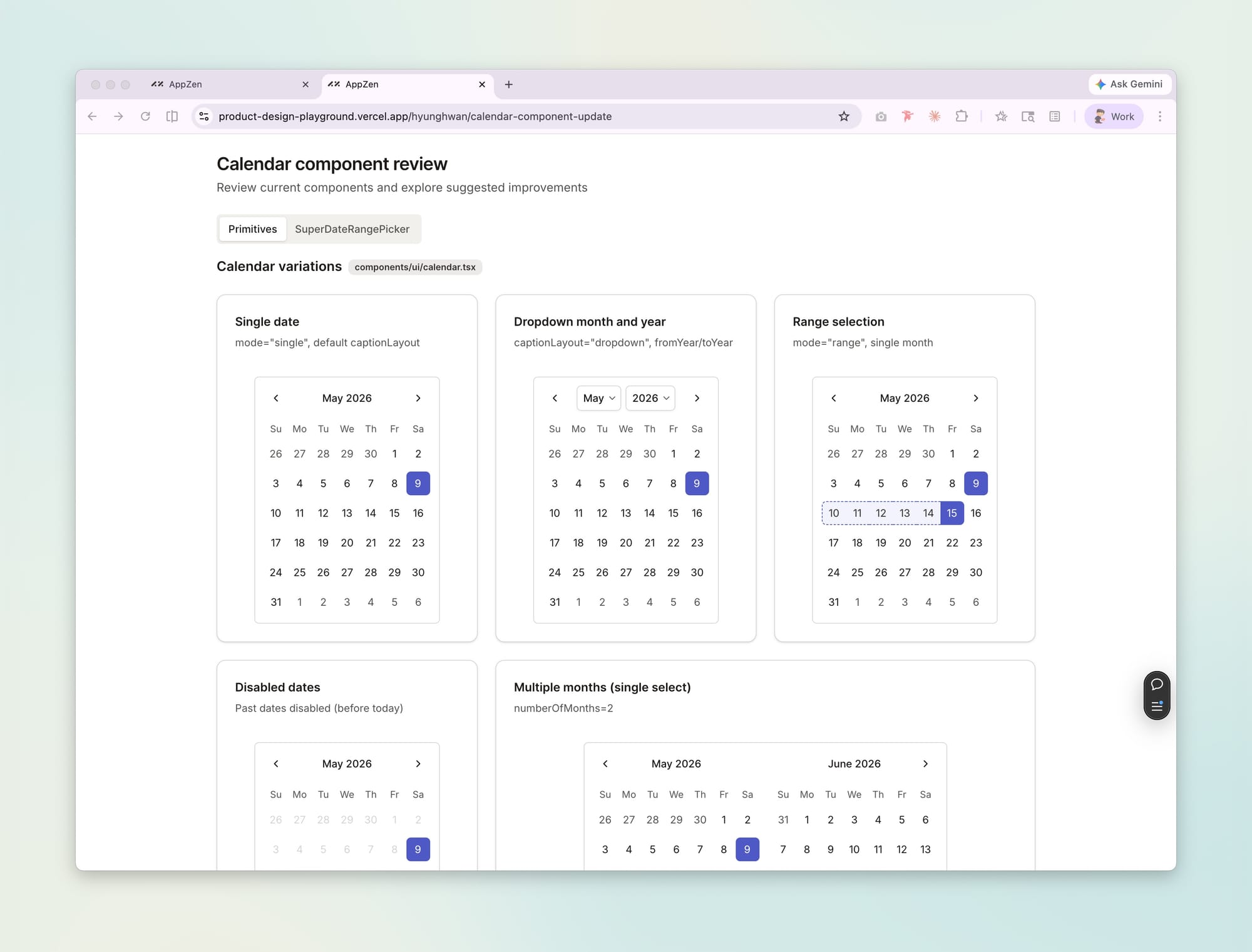
This worked, but I do not think it is the final answer.
The weak part is still context gathering. Customer tickets, Slack threads, Jira issues, and competitive references are scattered everywhere. I can manually collect them, but that does not scale. A Jira MCP or similar integration could probably turn that messy input into something more systematic.
This is one of the areas I want to improve.
The conversation with engineers changed
The biggest change is not the tool. It is the conversation.
Before, a lot of design review sounded like this:
This does not match the Figma. This spacing is off. This line should be different.
Those details still matter. But they are not the most interesting part of product work.
Now the conversation is more likely to be about the problem:
This feedback came from this customer. The severity is this high. Does this solution actually address the root issue?
That is a better use of everyone’s time.
The shared artifact is closer to the product. Engineers can use the same rules. Designers can work in the same medium. AI can help with the small repetitive details. So we can spend more energy on whether the solution is right.
Onboarding another designer
One concern I had was whether this workflow only works for designers who are already comfortable with code.
At AppZen, our design team is small. The other designer was not initially as familiar with this workflow, but onboarding was easier than I expected. Claude became part of the learning interface. She could ask questions, inspect files, understand patterns, and learn by doing.
That does not mean technical literacy does not matter. Git, components, routes, and file structure still matter. But the learning curve feels different now. You do not need to memorize everything before participating. You can ask the agent questions while you work, and each question builds understanding.
That experience made me think more seriously about how the design role is changing.
Everybody is becoming a builder
I do not think the future is that designers become engineers or engineers become designers.
I think more people are becoming builders.
Some builders will have stronger design judgment. Some will have stronger technical architecture skills. Some will be better at research, workflow, or systems thinking. But the hard boundary between roles is getting softer because AI lets more people create working artifacts.
For me, the responsibility of design has not disappeared. I still need to understand the problem, drive exploration, manage stakeholders, create alignment, and push the product forward.
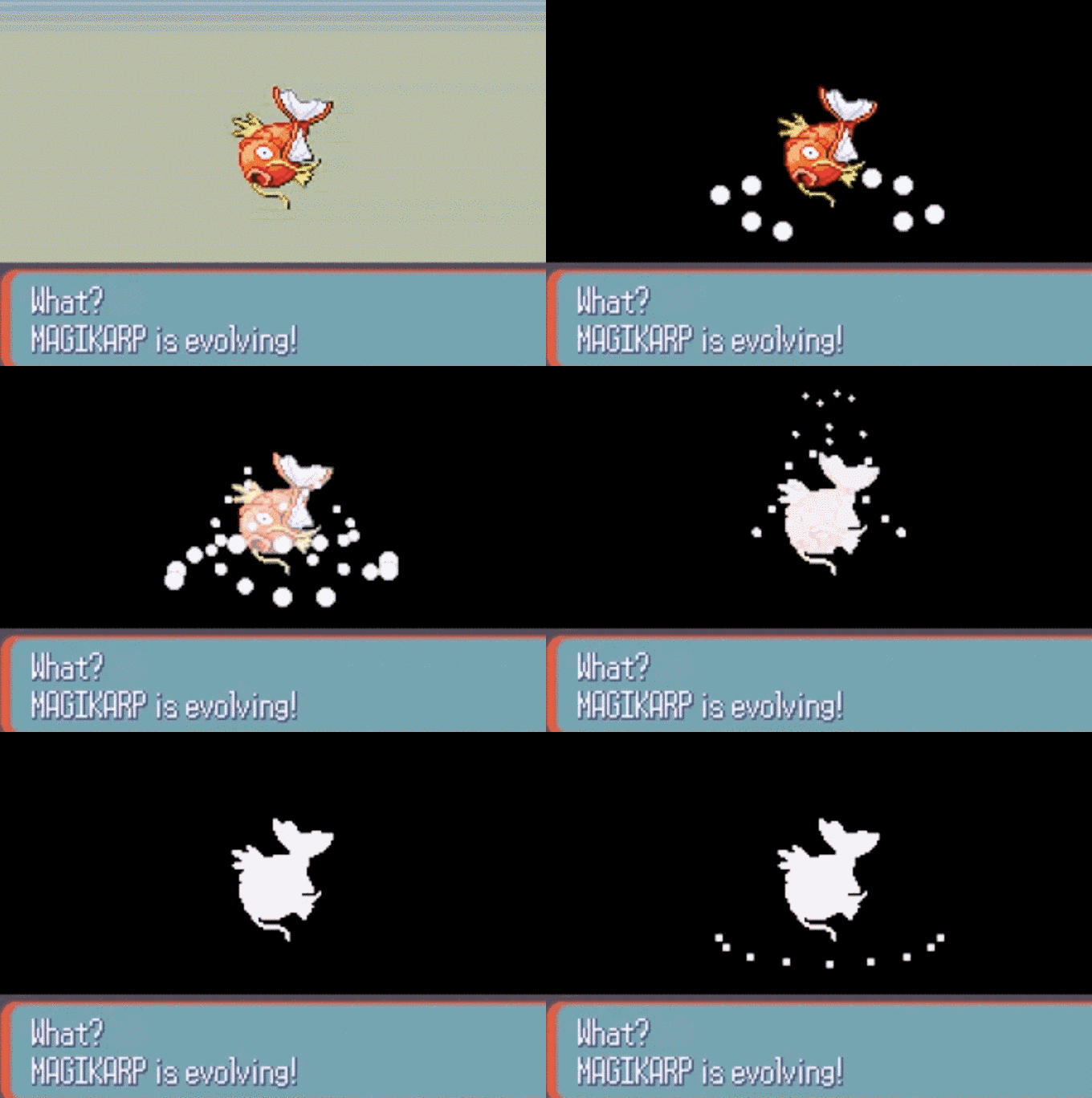
The tool changed.
The thinking did not.
What I still have not solved
I do not want to make this workflow sound more polished than it is.
There are still unresolved problems:
- branch deployment with security is still awkward
- design rationale is scattered across markdown files, Slack, Jira, and people’s heads
- component development needs a better context pipeline
- automated design system enforcement is still an idea, not a fully working system
- feedback collection from tickets and conversations is too manual
The biggest question is where the “why” should live.
Code captures structure. Prototypes capture behavior. Rules capture patterns. But the reasoning behind product decisions — the human thinking part — still does not have one obvious home.
I try to keep more of it in the repository so both humans and AI can access it. But I do not think I have the perfect answer yet.
Where I am now
Even with all those gaps, I do not want to go back to a Figma-first workflow for product design.
The code-based workflow lets me explore at the speed of the engineering team, reduce handoff friction, and collaborate around working artifacts instead of static interpretations.
It also changed how I use AI.
The best results do not come from treating the agent like a vending machine: type instruction, receive output. The best results come from conversation. I explain the context, ask questions, challenge the plan, review tradeoffs, and externalize my thinking as I go.
In that sense, the AI feels less like a tool I operate and more like a digital coworker that helps me think in public.
That is the part I find most interesting.
The future of design work is not just faster mockups.
It is a different way of turning thought into working software.
No spam, no sharing to third party. Only you and me.


![[에스콰이어 기고] 어도비의 세상이 계속될 것을 확신하는 이유](/content/images/size/w400/2024/02/SCR-20240131-ojqc.png)


Member discussion