
AppZen / AI Agent Studio
Overview
AppZen AI Agent Studio is a platform that enables enterprise finance teams to build, test, and deploy AI agents tailored to their financial operations. As the Principal Product Designer, I led the end-to-end design of this product—from initial concept through GA launch on December 16, 2025.
The core challenge: give finance professionals the power to create sophisticated AI agents while providing the safeguards necessary when dealing with real money.
Strategic Context
Before AI Agent Studio, AppZen faced a scaling problem. Every customer has unique workflows, policies, and requirements. To address their needs, we had to understand each company's specific processes, then build and update features accordingly. A one-size-fits-all approach simply didn't work for enterprise finance.
AI Agent Studio changes this equation. Instead of AppZen building custom solutions for each client, customers can now create AI agents tailored to their exact workflows. This shifts us from a service-heavy model to a platform model—dramatically improving our ability to scale while giving customers more control and faster implementation.
Design Principles
Three principles guided every design decision in AI Agent Studio:
1. AI-first, human-controlled
The AI does the heavy lifting, but humans always review and intervene. Every automated decision can be inspected, modified, and overridden.
2. Safeguards by design
Users shouldn't have to think about safety—it's built into the workflow. The system guides them through natural conversation to create agents that work correctly, with simulation and validation steps before anything touches live data.
3. Minimize time to value
Enterprise software is notorious for long implementation cycles. Every design decision aimed to get users from zero to working agent as fast as possible—through smart defaults, templates, and an assistant that asks the right clarifying questions.
The User Journey
Enterprise finance teams go through four stages when creating and deploying an AI agent:
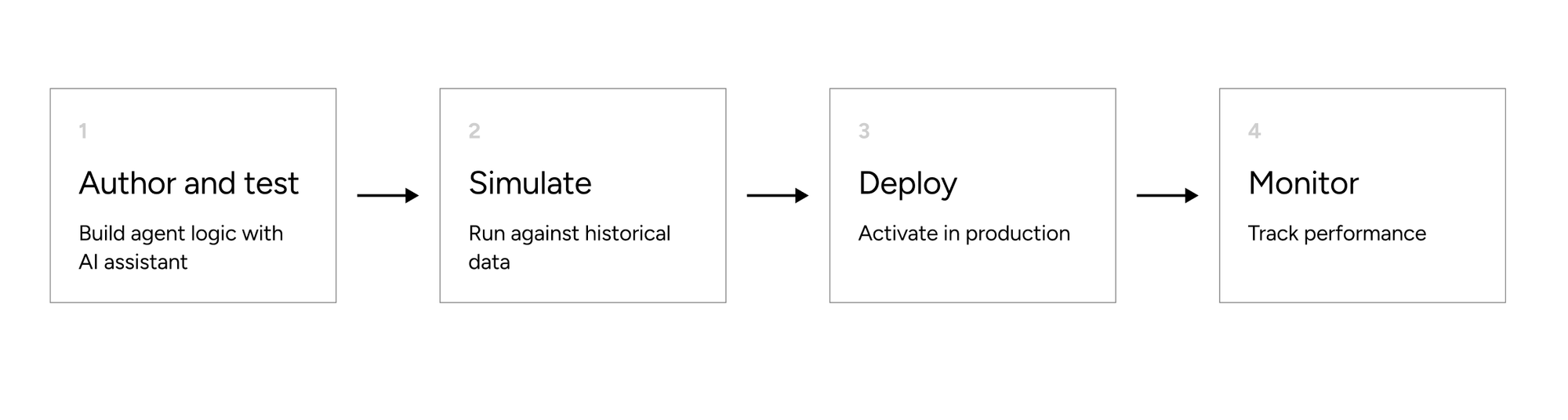
- Author & Test: Build the AI agent's logic and test it in real-time within the studio
- Simulate: Run the agent against historical data before touching live systems
- Deploy: Activate the agent in production
- Monitor: Track performance within AppZen's existing products
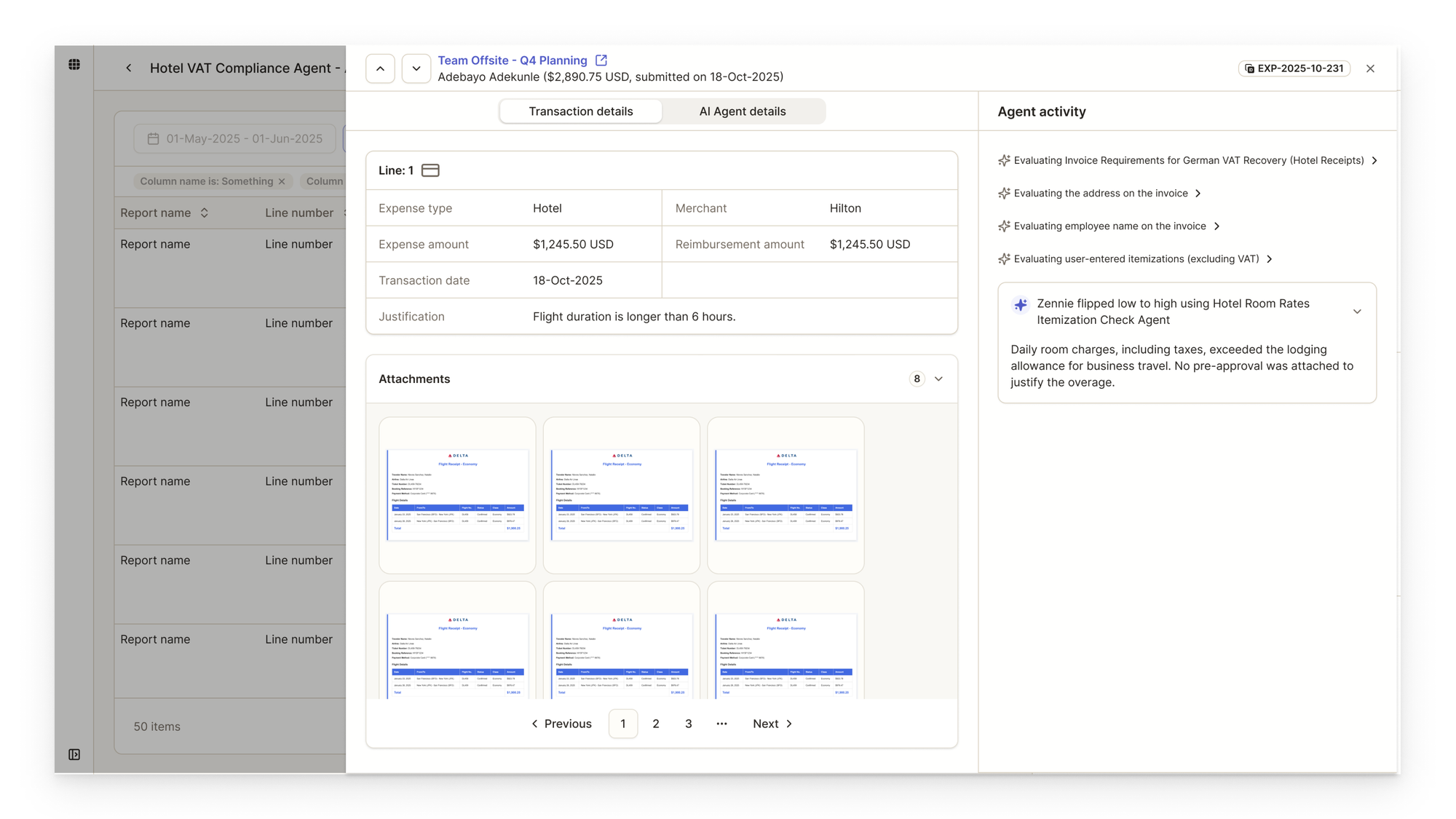
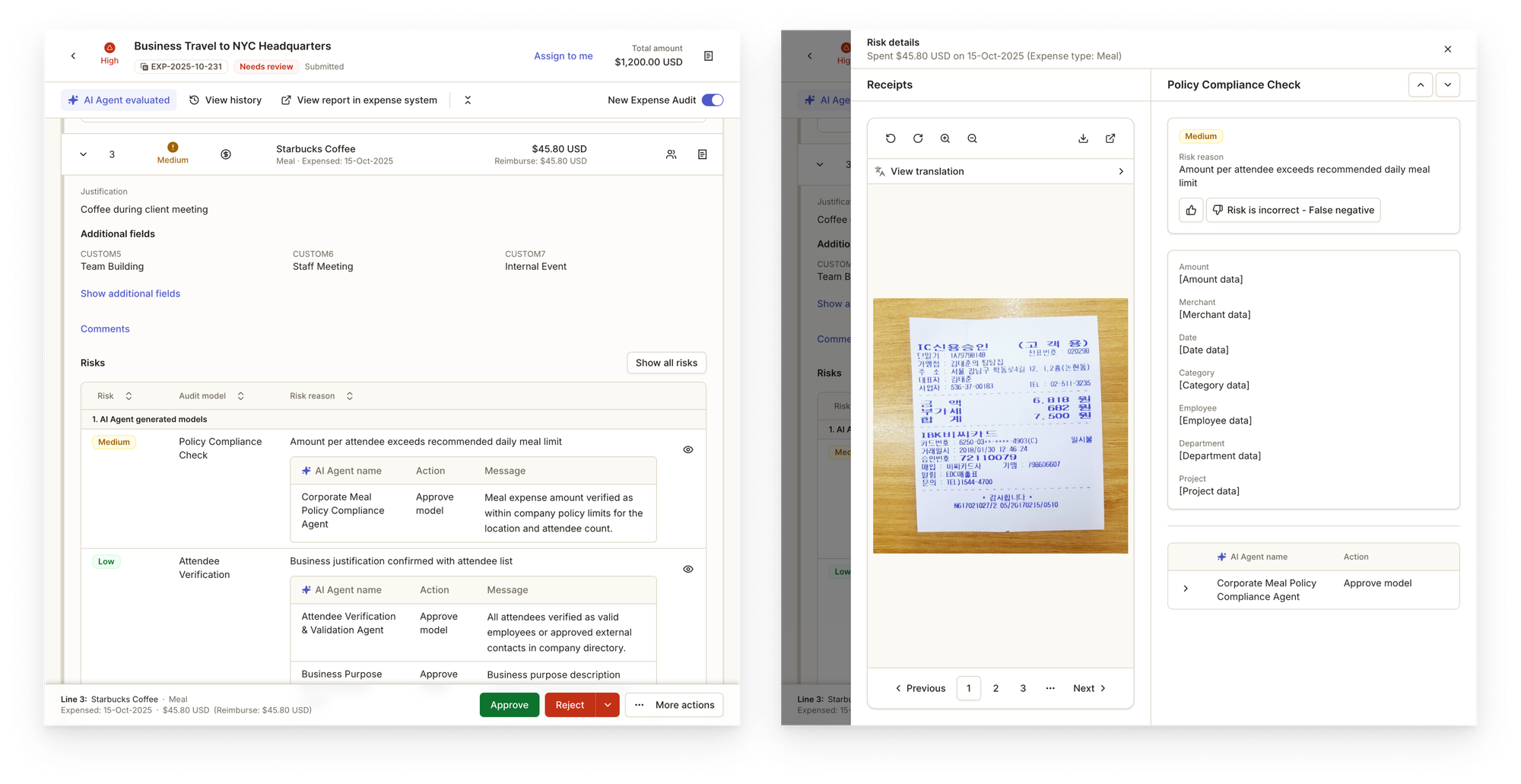
This workflow embodies our principles: AI handles complexity (AI-first), users validate at every stage (human-controlled), simulation happens before deployment (safeguards by design), and the flow is streamlined to minimize friction (time to value).
Deep Dive: Authoring Experience
Initial Hypothesis
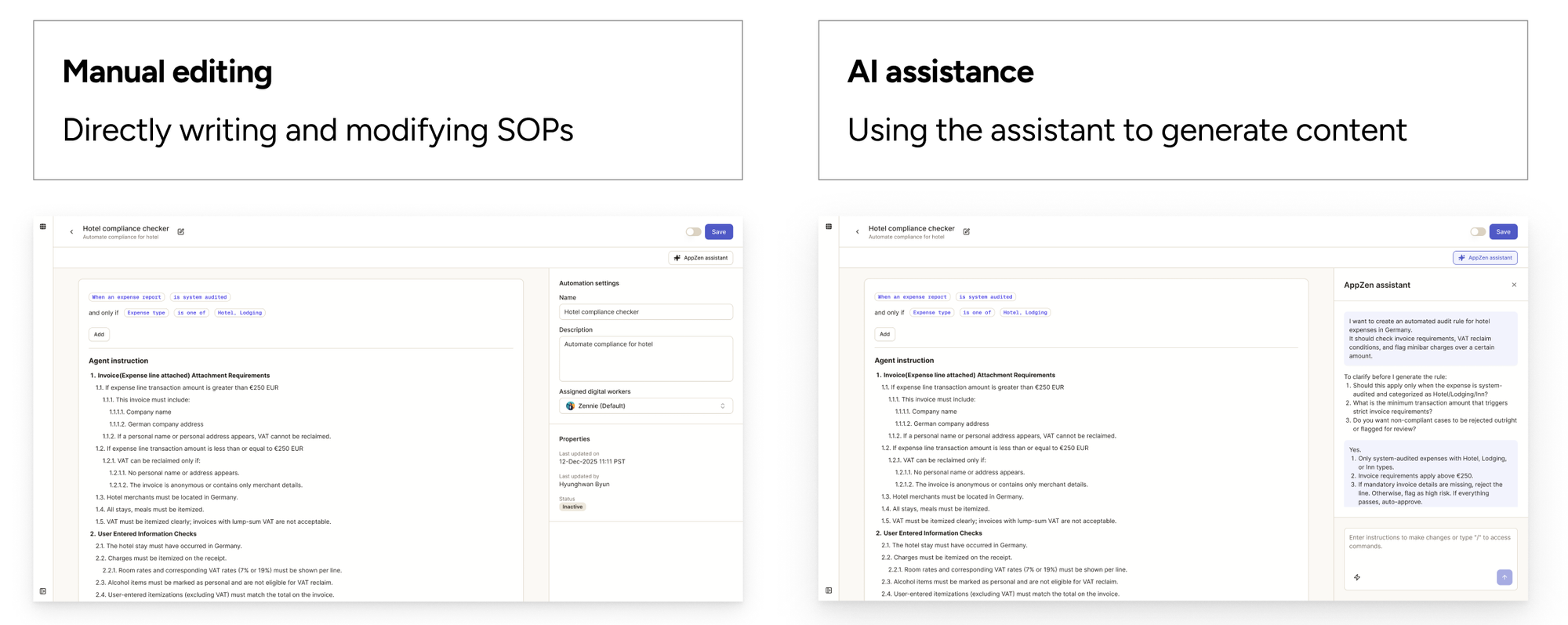
When I started designing the authoring interface, I assumed users would frequently switch between two modes:
- Manual editing: Directly writing and modifying SOPs
- AI assistance: Using the assistant to generate or refine content
Based on this assumption, I designed the interface with manual editing as the default experience, with AI assistant as an add-on feature. Users could toggle the assistant panel on and off easily—the mental model was "editor first, AI when needed."
What Design Partners Taught Us
During alpha testing, I observed something unexpected: 99% of interactions happened through the assistant. Users weren't manually editing—they were conversing with the AI to build their agents.
My initial assumption was wrong.
We were in early stages without analytics infrastructure, so these insights came directly from customer conversations and CSM feedback. Sometimes the most valuable data isn't quantitative.
Design Pivot
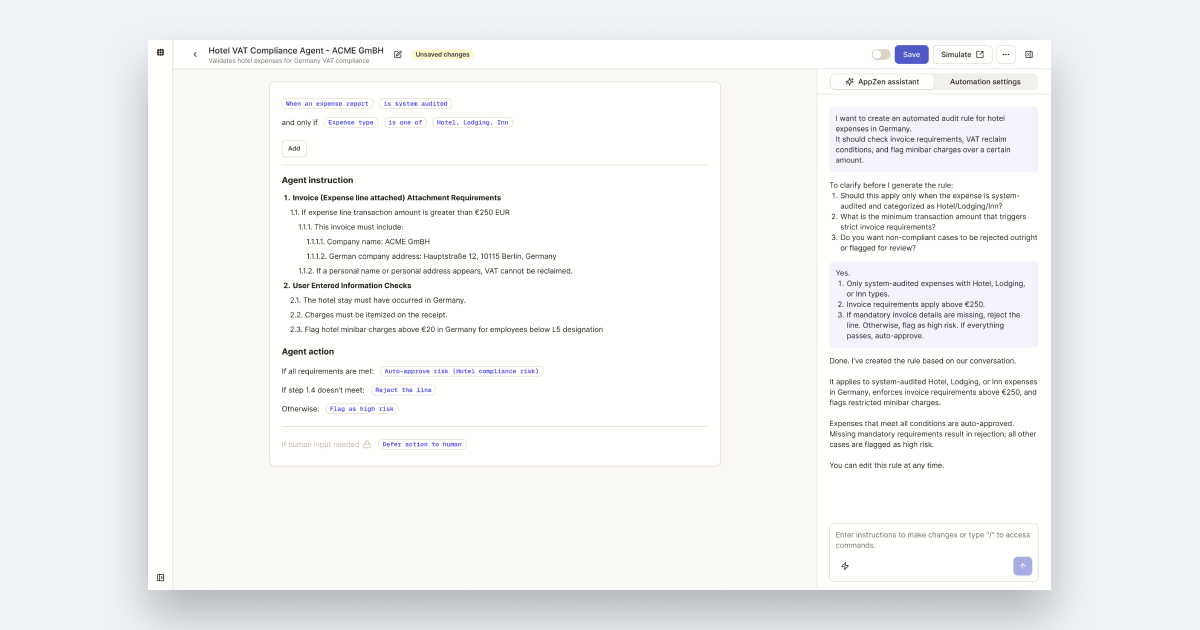
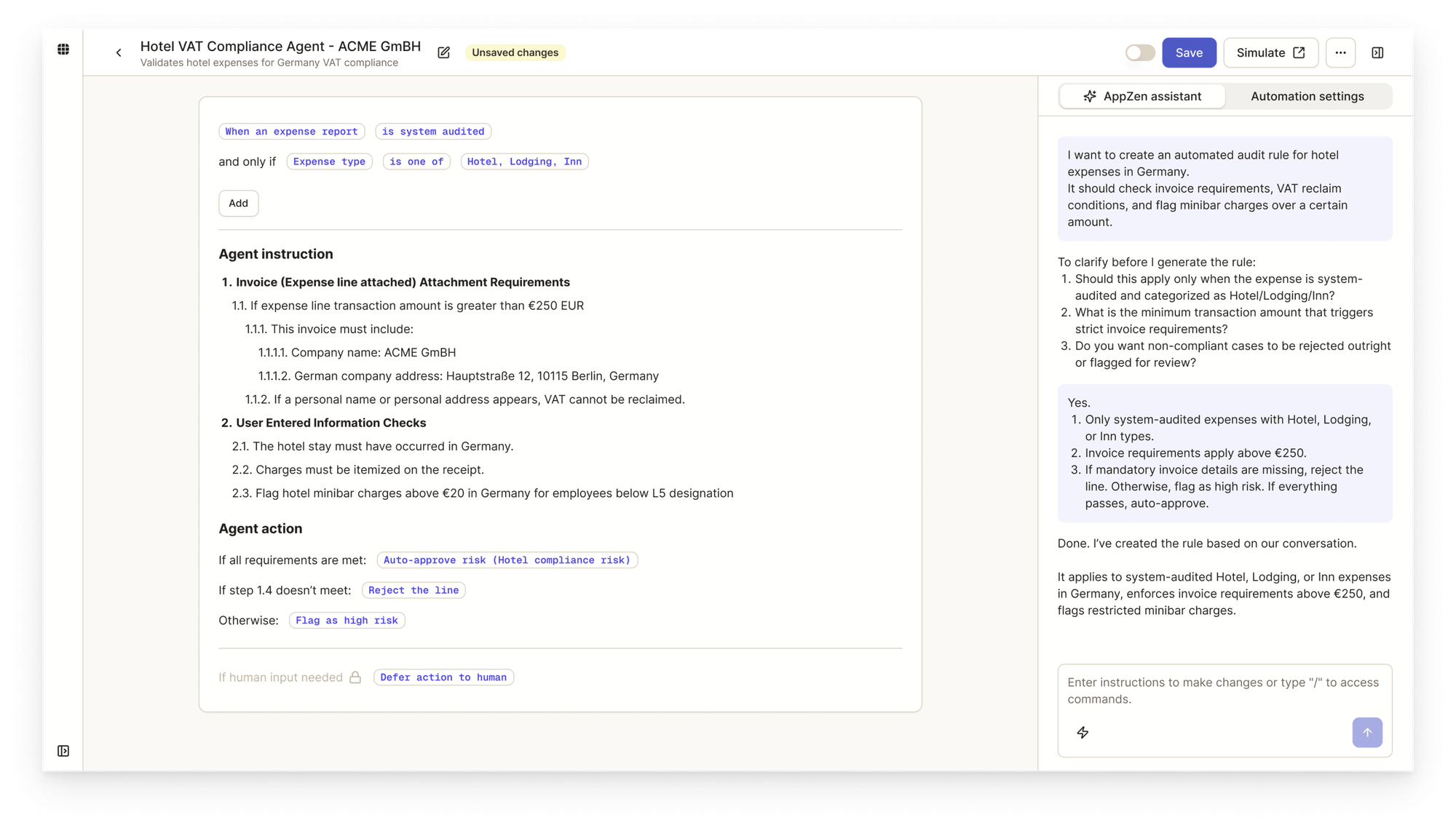
I redesigned with a new mental model:
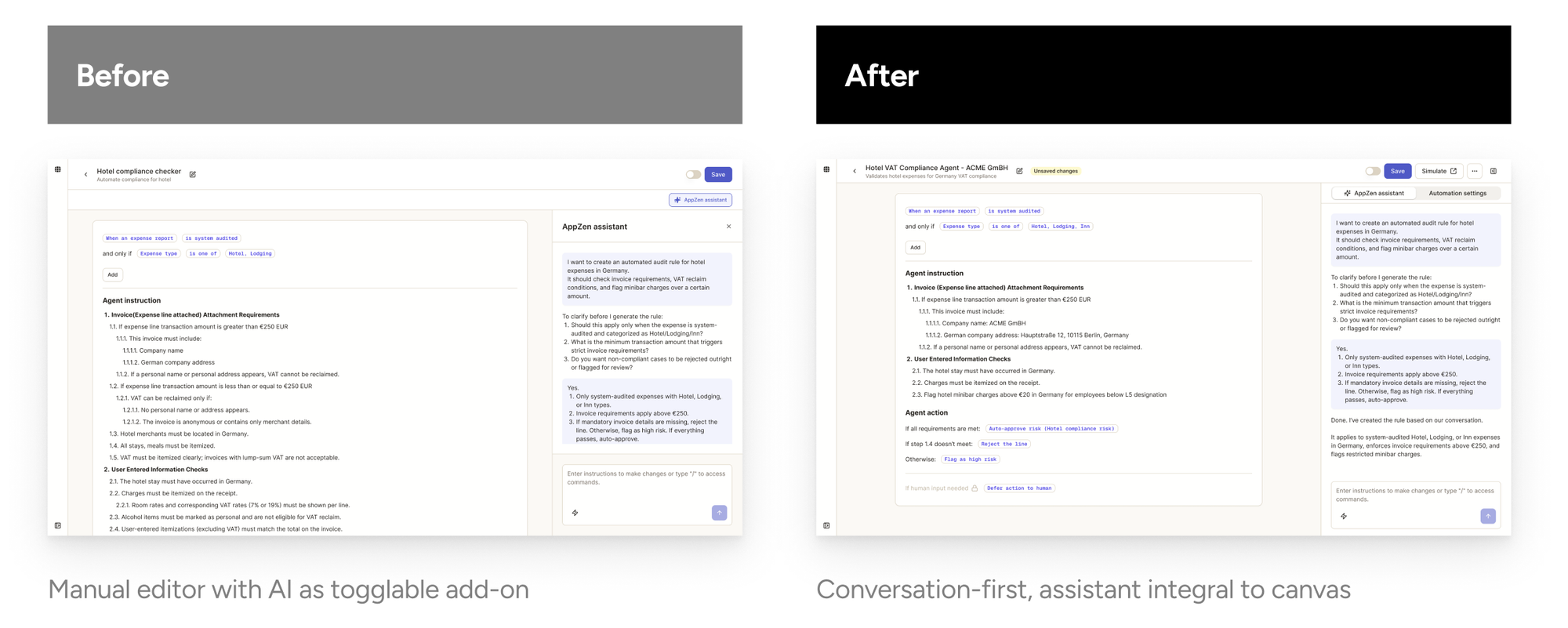
Key changes:
- Assistant always visible: AppZen Assistant is prominent by default, with an option to hide all panels rather than the reverse
- Simplified panel structure: Consolidated to one panel with two tabs—AppZen Assistant and AI Agent Settings
- Smart disambiguation: When a user says "apply expense audit to our company," the assistant asks clarifying questions—country, organization, cost center, policy—to generate a properly configured agent
The option for manual editing still exists—but it's no longer the default expectation.
Current Observations
Since GA launch, session recordings confirm users are engaging with the assistant as intended—using it as their primary tool for building agents, with minimal manual input.
Deep Dive: Simulation
The Problem
Expense auditing and accounts payable directly affect a company's cash flow. Mistakes have real financial consequences. Users need confidence that their agent works correctly before it touches live data.
Why a Dedicated Page
Early in the project, there was discussion about keeping simulation inline within the authoring experience. Some internal stakeholders preferred having everything on one page to reduce navigation.
Through the design process, I identified why this wouldn't work:
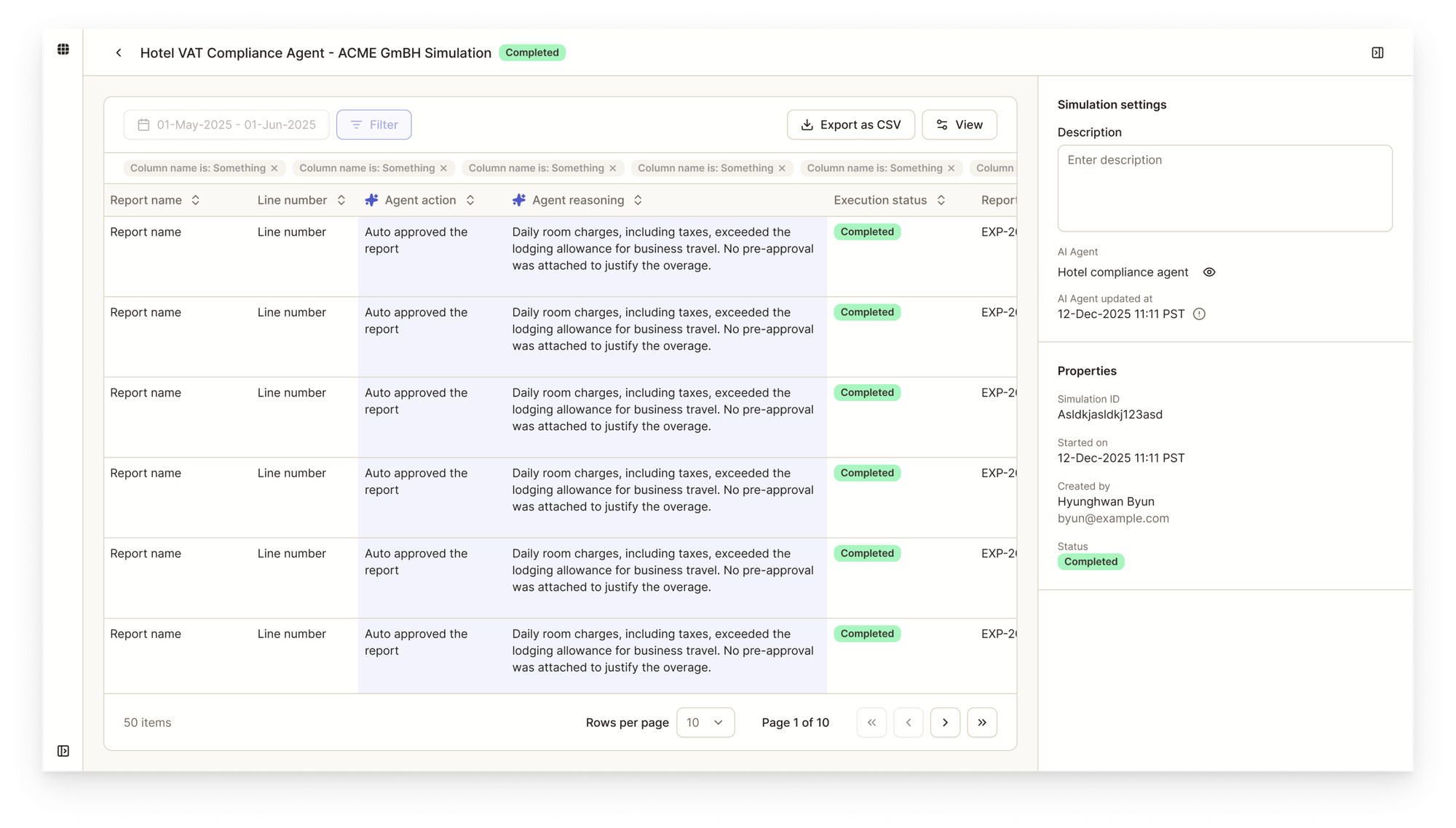
Scale of testing: Users need to test against a quarter or six months of historical data to see trends. Does the agent behave consistently? Are there patterns in its decisions? This isn't a quick spot-check—it's comprehensive validation.
Dual-level analysis: Users need both macro and micro views. At the macro level, they review batch results across hundreds of transactions to spot overall patterns. At the micro level, when something looks off, they drill into a specific transaction to see exactly how the agent behaved.
Design Solution
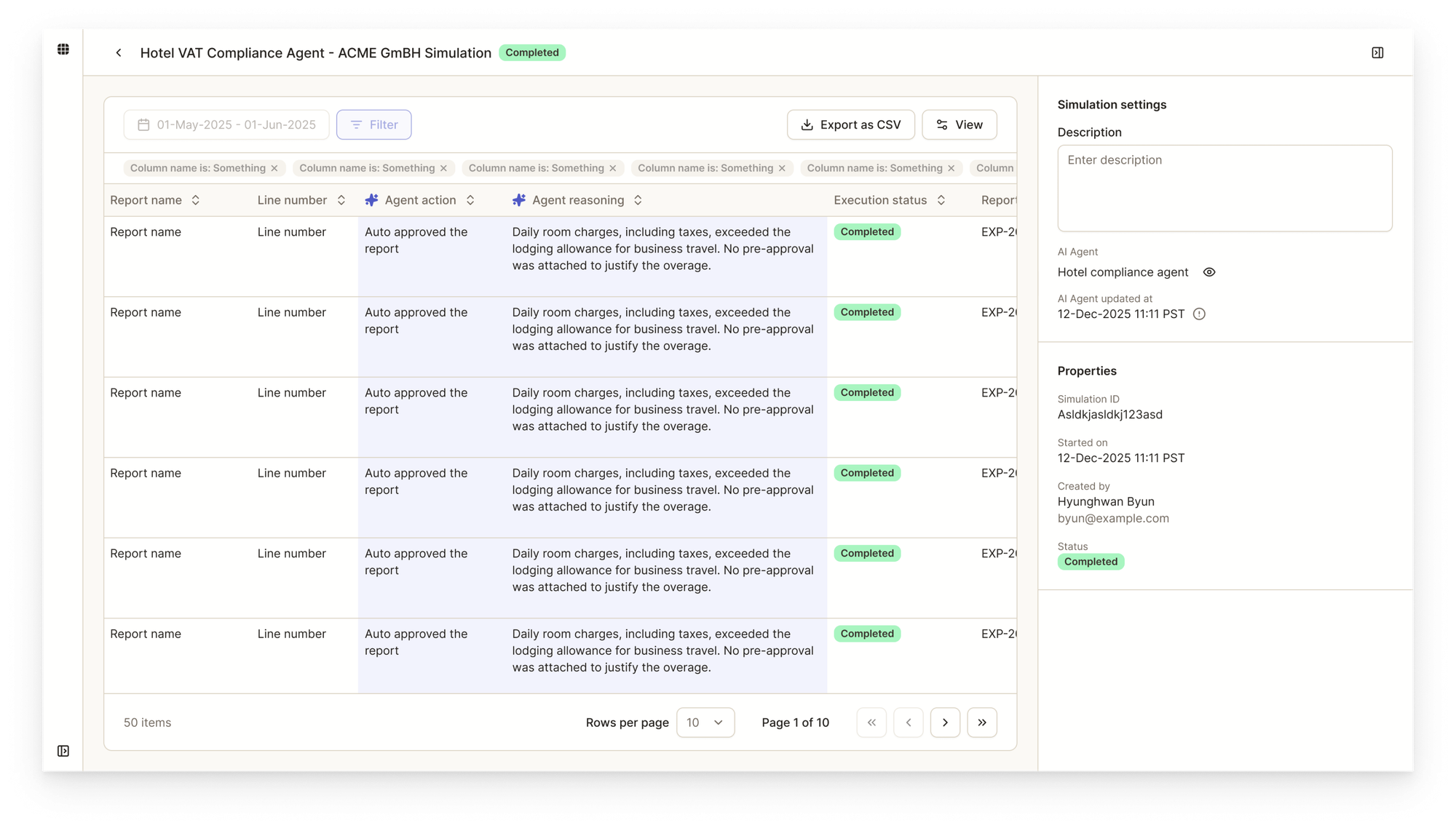
The Simulation page supports this workflow:
- Import historical data (expenses or invoices) for a defined period
- Run the AI agent in batch mode
- Review aggregate results and identify issues
- Click any transaction to open a flyout showing the original data and the agent's decision process
- Make adjustments and re-run as needed
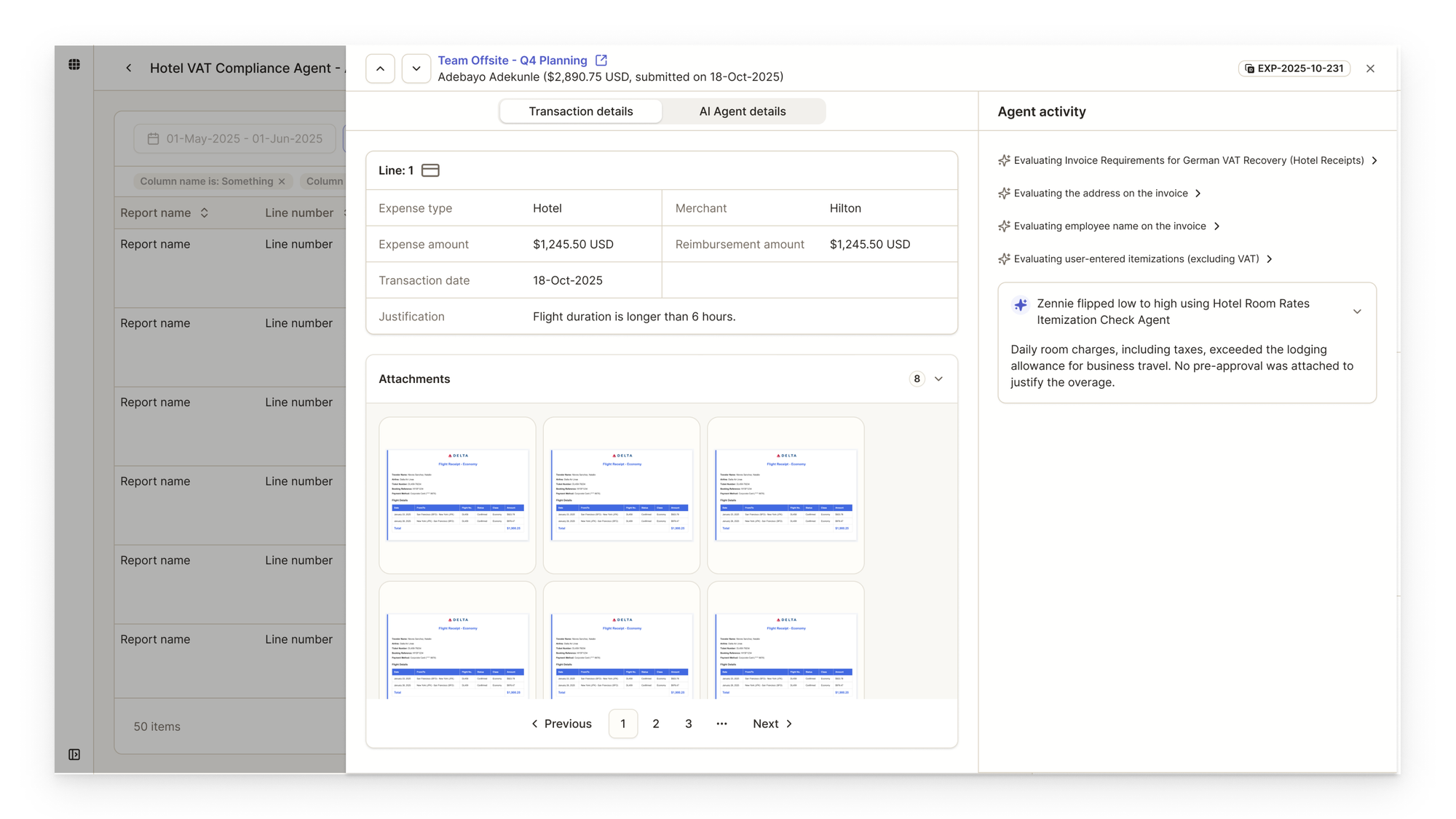
The separation reinforces a mental shift: authoring is creative work, simulation is validation work. Different modes deserve different spaces. Early wireframes explored the single-page approach, but as I gathered more context—data volume requirements, the need for trend analysis, the distinction between creation and validation modes—the case for separation became clear.
Deep Dive: Templates
The Problem
Our customers are primarily Fortune 500 companies with complex organizational structures—multiple policies, cost centers, currencies, and regional requirements.
Through discovery, I found that many agents share the same core logic with minor variations: a currency change, a country-specific rule. Building from scratch each time wastes effort.
Design Solution
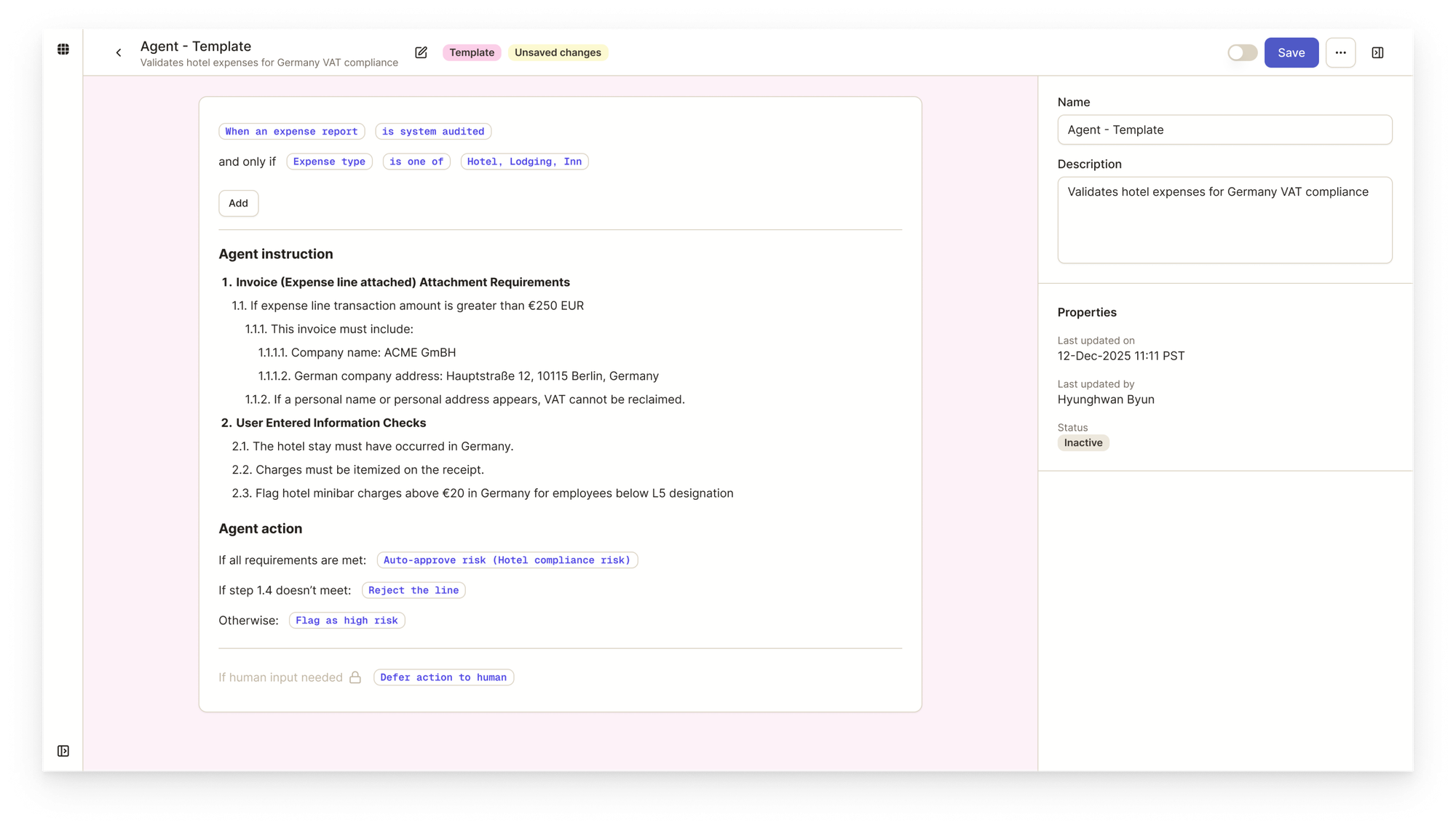
1. Create templates from anywhere Users can save any agent as a template directly from Agent Studio or from the list view. Templates emerge naturally from existing work.
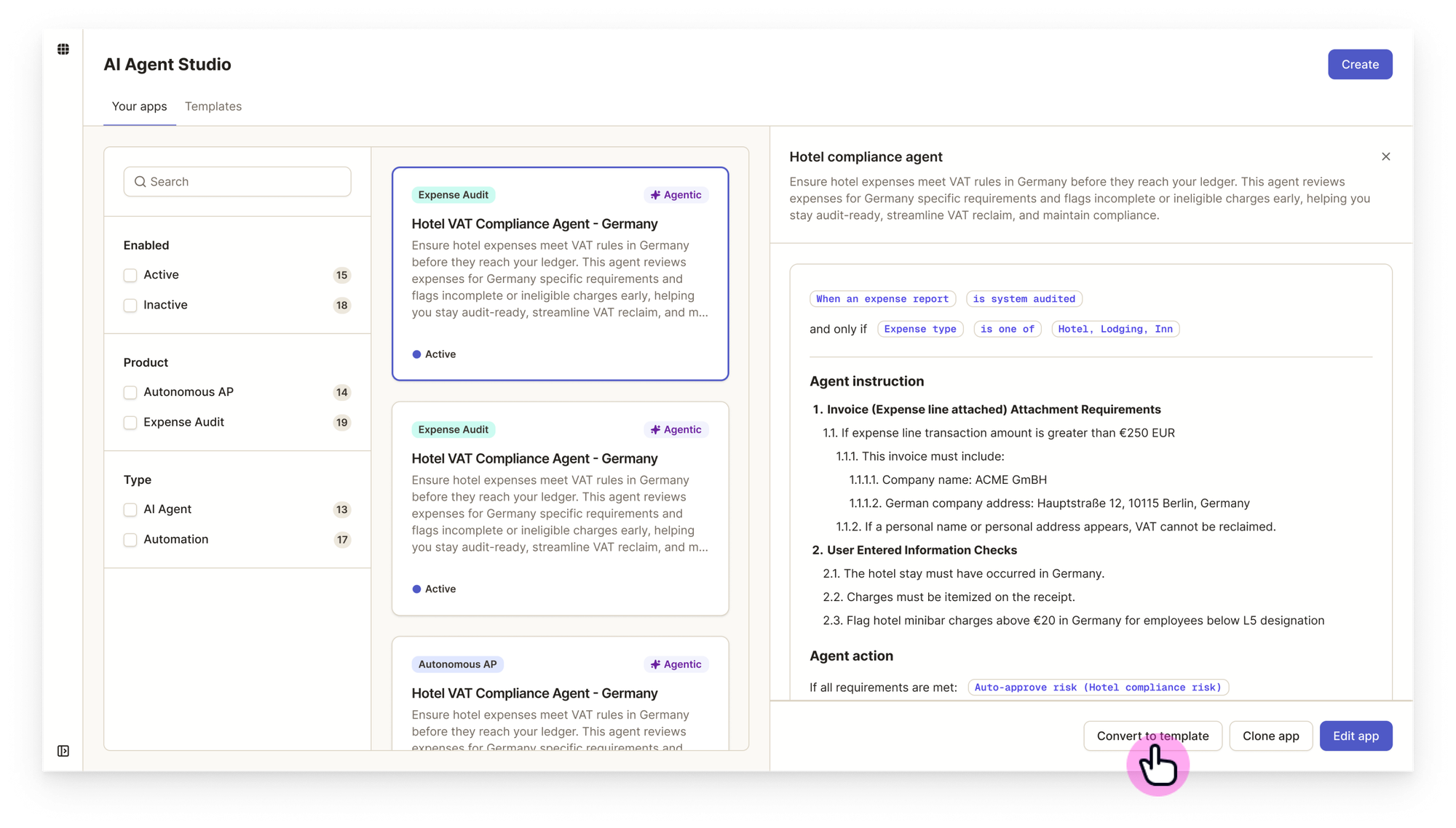
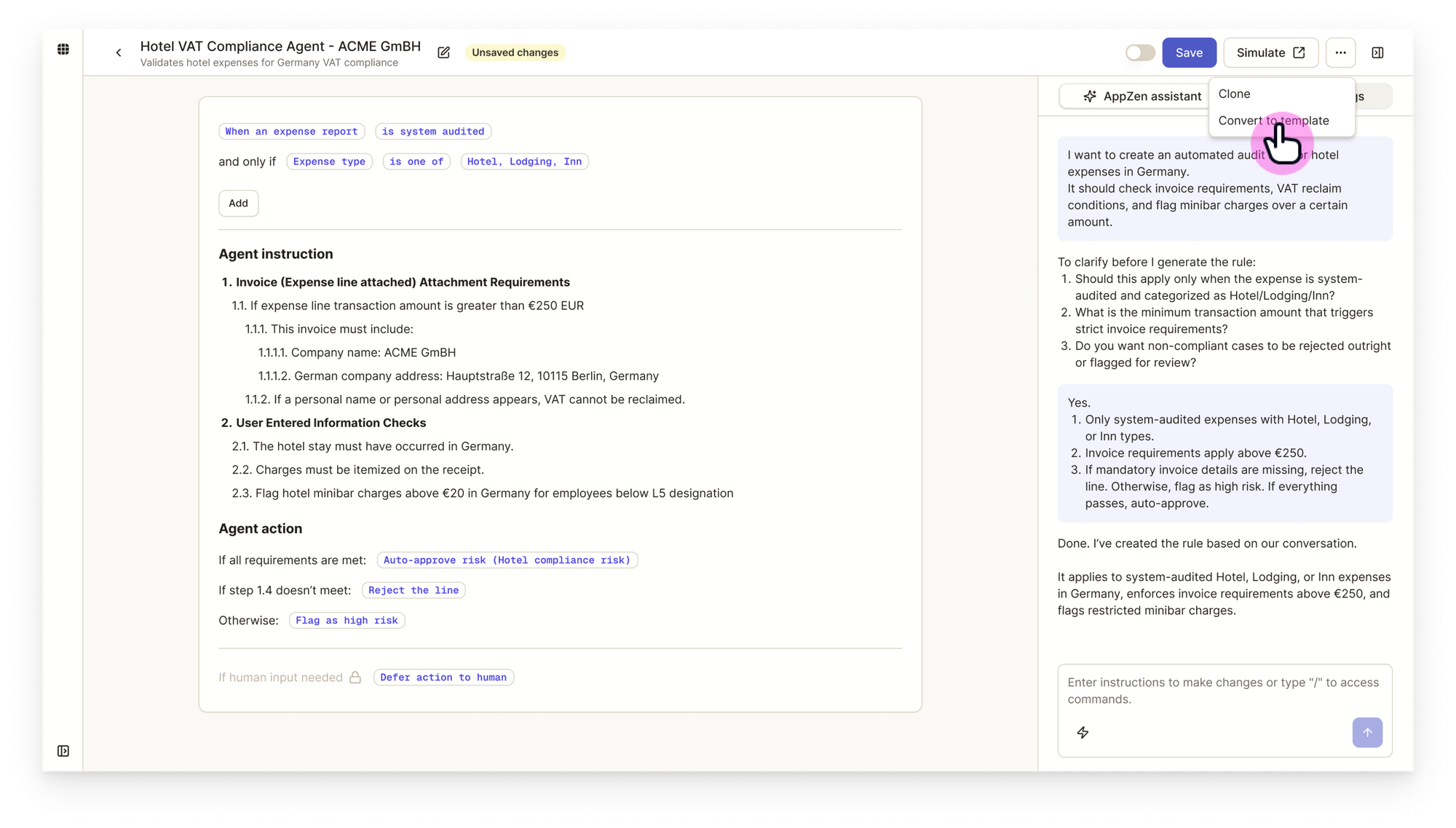
2. Clear visual distinction Template mode uses a different color scheme and badge system. This prevents accidental edits to shared resources.
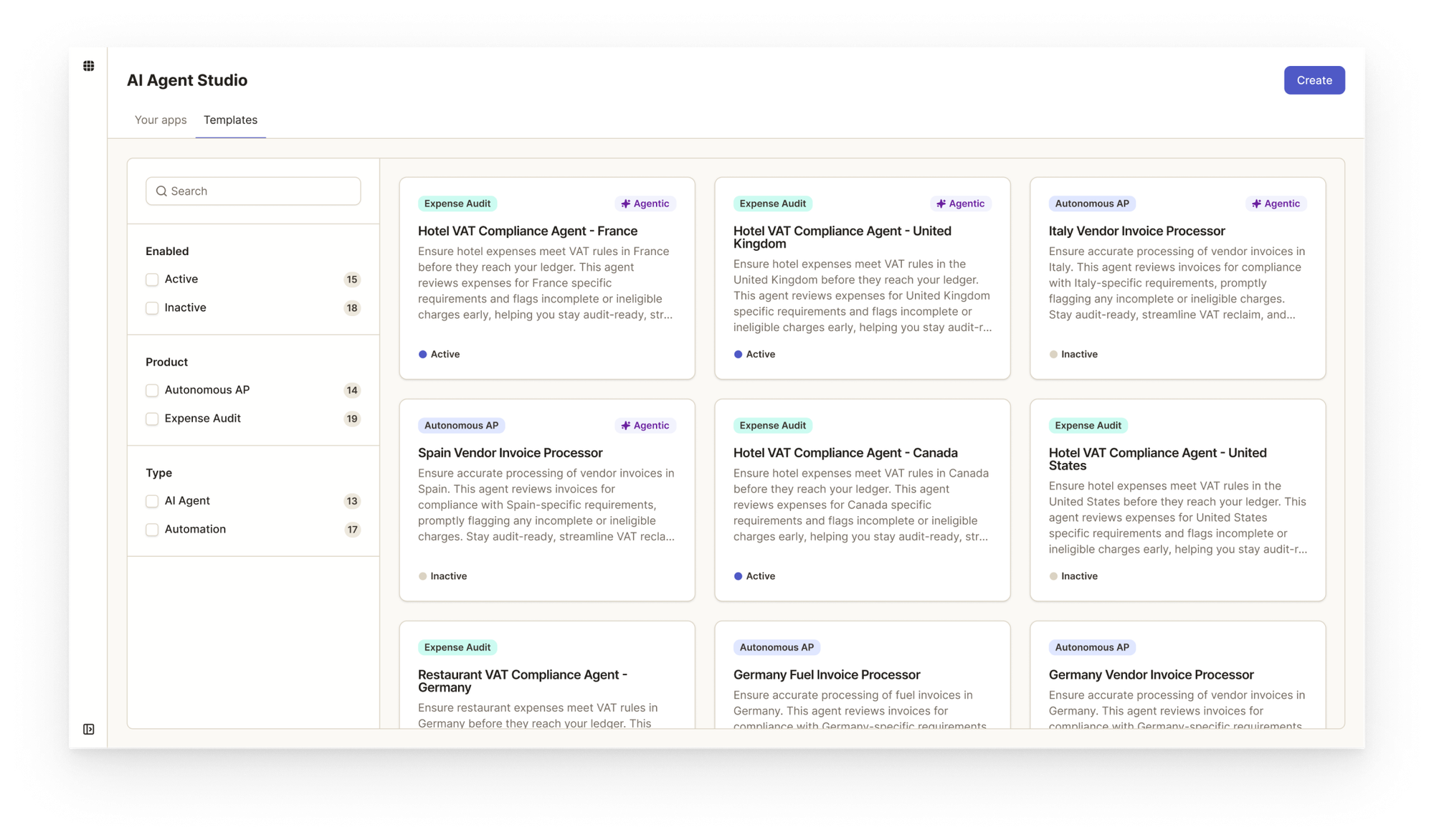
3. Factory templates AppZen provides pre-built templates that give customers immediate value and serve as product education—showing best practices through working examples. This directly supports our "minimize time to value" principle.
Cross-Functional Process
Weekly Syncs
I worked closely with PM, Engineering leads, and Data Science leads in weekly syncs. My role focused on:
- Defining the overall framework and principles
- Translating requirements into designs that validate feasibility
- Ensuring we solve customer problems while minimizing time to value
The current structure—studio list, agent detail, simulation pages—all emerged from workflows we identified together. It wasn't about jumping to solutions, but understanding the problem space first: How much data is needed to validate agent behavior? How should the assistant guide users through disambiguation? These questions shaped every design decision.
Stakeholder Collaboration
Design reviews happened regularly with technical leadership, ensuring alignment between design vision and engineering reality. At key milestones—like preparing the product teaser video before GA—I synthesized customer feedback, team input, and strategic direction into user flows that communicated our vision clearly.
Design Execution: Vibe Coding
Building AI Agent Studio, I expanded beyond traditional design handoffs. Instead of delivering Figma files to developers, I used Cursor and Claude Code to push code directly to the development branch.
This approach worked best for details—not everything. Figma remains essential for exploring overall flows and communicating with stakeholders. But when it comes to fine-tuning layouts, perfecting interactions, and polishing animations, working directly in code dramatically improved implementation quality. It's about knowing when to use each tool.
Read my thoughts about using vibe coding in a team environment
 Hyunghwan Byun • 변형환
Outcome & Reflections
What launched: AI Agent Studio reached GA on December 16, 2025.
Early signals: Session recordings show users actively building agents through the AppZen Assistant, validating our design pivot toward a conversation-first experience.
What I learned
- Validate assumptions early: My hypothesis about manual editing was reasonable but wrong. Direct customer feedback during alpha prevented us from shipping a suboptimal experience.
- Separation can be a feature: The instinct to put everything on one page is strong, but distinct mental modes deserve distinct spaces. Simulation being separate isn't a limitation—it's intentional.
- Right tool for the right job: Vibe coding improved detail-level quality, but Figma remains essential for flows and stakeholder communication. Mastery isn't choosing one—it's knowing when to use each.
What's Next
Current agent logic uses basic badges for triggers, actions, and other elements. I'm developing custom components with richer variants, improved interactions, and better readability—continuing to refine the authoring experience post-launch.
Custom component in development